Short-form video, rendered on your own GPU
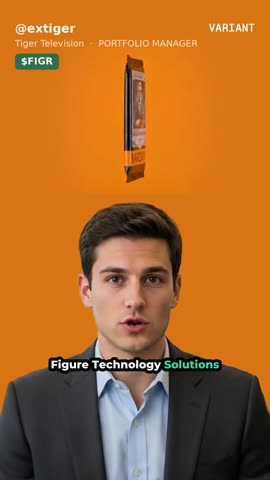
A photo, a ticker, and something to say. It writes the narration, speaks it, animates a presenter and composites a 9:16 clip.
Two ways to use it
The same pipeline is available two ways, and they trade speed for effort in opposite directions.
Install it
Everything on this page: a pip install that runs the models on your own GPU. Fastest renders, no queue, no per-video cost beyond your machine. This is the way to run it at volume or to modify it.
Call it
No GPU, no install. Create an account at variantvideo.com, mint a key under API keys, and submit renders over HTTPS — they run on our hardware and you get a webhook when the video is ready. The reference lives at /developers. Free while in beta; plans and higher limits later.
Install
$ pip install video-gen-local
$ vgl install       # GPU environment + models, ~1 hour
$ vgl serve         # studio on localhost:7860
That is the whole install — no clone, no checkout. The setup scripts ship
inside the package, so vgl install runs from wherever pip put
it.
Why two steps and not one
pip install gives you the CLI, the studio, the renderers,
text-to-speech and captions. It cannot give you the avatar model, for two
reasons that are not going away:
- It needs Python 3.10 where the rest of this needs 3.12, so it lives in its own environment.
- Its
flash-attnwheel has to match the C++ ABI of the torch that was just installed. A dependency list cannot say "whichever wheel matches the torch you are about to have".
And the weights are about 110 GB of model downloads, which
are not Python packages at all — pip was never going to fetch those.
vgl install does both jobs, in the order that matters (torch
before the requirements that would overwrite it, numpy re-pinned last).
Prefer to work from source? git clone then
pip install -e . gives you the same three commands.
What you need
| Component | Minimum | Comfortable |
|---|---|---|
| GPU | 24 GB VRAM, CUDA 12.x | 80 GB (H100 / A100) |
| Disk | 150 GB | 250 GB |
| RAM | 32 GB | 64 GB |
| OS | Linux, ffmpeg | Python 3.10 and 3.12 |
A GPU is required. There is no hosted fallback and no CPU path. If
nvidia-smi does not print your card, nothing here works.
Runs the same on your own machine, on Nebius, or on AWS. The only real
difference between providers is whether stopping the machine wipes its disk —
on a VM cloud it does not, on RunPod or Vast it does, and
vgl install simply re-provisions.
Keys
Every account is your own. There are no shared credentials in the source, and the studio refuses a job whose template needs a key you have not set rather than failing partway through a render.
| Variable | Needed for |
|---|---|
POLYGON_API_KEY | Prices, company name, market cap |
FAL_KEY | The fight card only — it generates its artwork |
HEDGEFUND_API_KEY | The events feed — catalyst, showdown and recent-event read it |
FMP_API_KEY | earnings-call only — call transcripts. A plan that includes the transcript endpoints (they sit above FMP's Starter tier) |
SEC_USER_AGENT | recent-event's quote. The SEC requires a declaring User-Agent with a contact address on EDGAR requests |
$ cp .env.example .env # required keys are at the top, uncommented
Make one
Open the studio, pick talking-head, drop in a front-facing photo, type a ticker and a sentence of notes, press Generate. About fourteen minutes at 480p.
The studio has no authentication. Reach it over an SSH tunnel
rather than exposing the port:
ssh -fN -L 7860:localhost:7860 user@host
General videos: every template can render with no identity bar at all — no handle, channel, tier band or ticker chip in the frame. Tick General video in the studio, or pass is_general: true on the API. Publishing to a Variant channel with asChannel implies it.
Templates
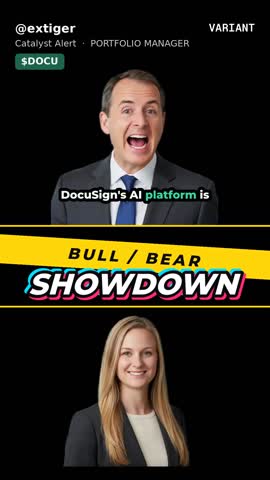
The layouts. They differ in what they put on screen and what they need from you — not in quality.
on this machine

on this machine
on this machine
on this machine
on this machine
on this machine
on this machine
on this machine
These are frames from real renders on this machine, not mockups. The two without one have simply never been run here — the studio shows every template regardless.
How it works
Variant integration
Access note: publishing finished videos into Variant uses Variant’s pre-made publish endpoint, which is a restricted capability — your Variant account needs publish access granted in addition to an API key. Request it from Variant; rendering works either way, only the publish step needs the grant.
If you publish to Variant, the studio can render as one of your avatars and post the finished video back. Your token is the identity — paste it once and everything else is read from it.
The key is the identity, so the server holds none. Each person supplies their own in the browser and sees only their own avatars — two people can share one studio without either being able to post as the other. Clearing the field disconnects.
Publishing needs the CDN step. Variant fetches the file from a public URL, so a render that was never uploaded has nothing to post.
If something breaks
| Symptom | Fix |
|---|---|
libcublas.so.12 missing | Torch drifted to CUDA 13. vgl install venvs |
Python.h missing | apt-get install python3.12-dev |
| Render dies at the last segment | VRAM. vgl install detect re-measures and caps clip length |
| A template is greyed out | It needs a key you have not set. The message names it |
| Slower than yesterday | On a container cloud you were rescheduled onto a different host |
vgl doctor --deep checks every stage and tells you which one
is unhappy.